Finding the Right AI Model for the Job and the Budget
How AI-driven prompt optimization helps teams compare models on quality and cost to decide when switching is worthwhile.

In our previous post, we argued that the real AI lock-in is a regression risk. Teams need evidence that a model change will preserve the behavior their business depends on. Evals make that change testable.
That testing matters because a newer model is not automatically a better one for your task. When Luna 6 was released, we were eager to upgrade a use case that extracts structured data from PDFs and images, only to find that it did worse than Luna 5.6 on our evaluation. Frontier improvements are still jagged: a model can advance on many fronts and still regress on the work you need it to do.
But measuring a model change is only the first step. A prompt refined over months for the current model may not bring out the best in a new one. A first evaluation tells you how the new model performs with the existing prompt, but a fairer comparison requires adapting the instructions and testing again. Doing that by hand for every candidate takes time.
With evaluations and an optimization workflow in place, AI can carry out much of that iteration: examine failures, propose prompt changes, and test them. Teams can then compare the resulting model-and-prompt configurations on quality and cost with less manual effort.
This is the central idea behind AI Document Workbench, our new module inside CoPlane. We built AI Document Workbench from our experience tuning prompts for real customer use cases. That work showed us the value of bringing trusted evaluations, prompt optimization, and cost measurement into one workflow. The Workbench applies that approach to extracting data from invoices, purchase orders, packing slips, and other business documents.
Give each model a chance to improve
Consider a team extracting data from corporate documents with an expensive model. A cheaper alternative becomes available, but its first results are worse: it confuses invoice dates with due dates or quantities ordered on a purchase order with quantities shipped on a packing slip.
The first comparison is useful. It tells the team what happens if it changes the model and keeps the existing prompt. It leaves another question open: how well could the cheaper model perform with instructions adapted to it?
A prompt carries assumptions about what the model already understands and what needs to be spelled out. Each model has its own behaviors, and instructions developed through months of use with one model may need work when applied to another.
An engineer can do that work manually: inspect failures, revise the prompt, run it again, and check for regressions. Repeating that process for every promising model takes time. Automatic prompt optimization lets AI carry out much of that iteration, with evaluations providing the feedback.
The unit we want to compare is therefore a configuration: the model, its settings, and the prompt used with it.
Use AI to do the iteration
AI Document Workbench implements a prompt-optimization loop based on GEPA, a method for improving prompts through reflection on execution results. An assistance model examines examples, outputs, and feedback, then proposes changes to the instructions used by the model being evaluated.
In the Workbench, the process is:
- Run the current prompt on development documents with trusted answers.
- Run evals against the trusted answers and automatically pass failures and feedback about what went wrong to the assistance model.
- Generate revised instructions and test them on the extraction model.
- Keep promising versions, test them on more development documents, and repeat within an authorized budget.
- Evaluate the selected version against the original prompt on a held-out set of documents to check whether the improvement holds.
For the invoice example, the assistance model might identify that "date" is underspecified and propose an instruction that distinguishes the issue date from the payment deadline. The extraction model then runs with that change. Its results determine whether the proposal advances.
The assistance model can be different from the model doing the extraction. It's often useful to use a more capable model to develop instructions for a cheaper one under test.
The result is an inspectable prompt version, with a record of how it performed. The team can see the instructions, compare them with the previous version, and decide whether to adopt them.
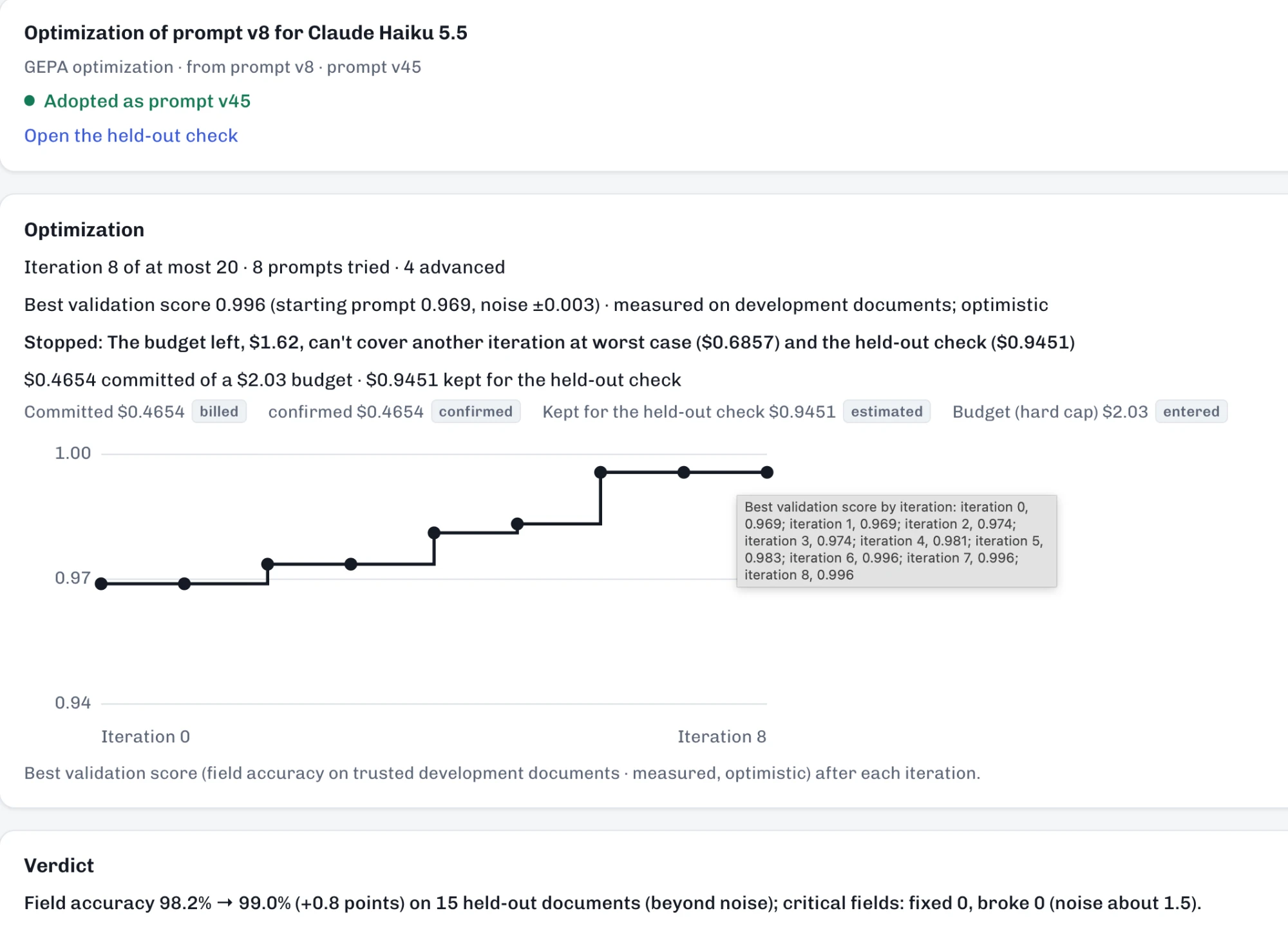
This is where evals become especially useful: they provide feedback for a repeatable improvement process. An evaluation tells us where a configuration falls short; optimization uses that evidence to search for something better. Prompt optimization is a search problem: evals produce the objective, and the agentic loop hill-climbs it.
Give the optimizer a trustworthy target
That process depends on what the evaluation rewards.
If the expected answer is wrong, optimization can teach the prompt to reproduce the mistake. If a score treats every field as equally important, a higher score can conceal an error in the amount a customer will pay.
In our work deploying models to customer use cases, we often found creating reliable evaluation sets to be the hardest part. Building the dataset for ground truth sounds simple, but at scale we often found it difficult to deal with the long tail of discrepancies and disagreements.
It was therefore critical for us that AI Document Workbench helped you build the right evaluation set for your use case. Teams import documents and existing outputs, review the fields and tables they want extracted, and make business conventions explicit. Does "quantity" mean ordered or shipped? Does a missing tax amount mean zero? Which values must be correct for each document type to pass?
Imported outputs remain provisional until reviewed. The Workbench brings together those outputs and model readings to help a person resolve disagreements against the source document. Critical values require a person's check, and a person approves each trusted answer.
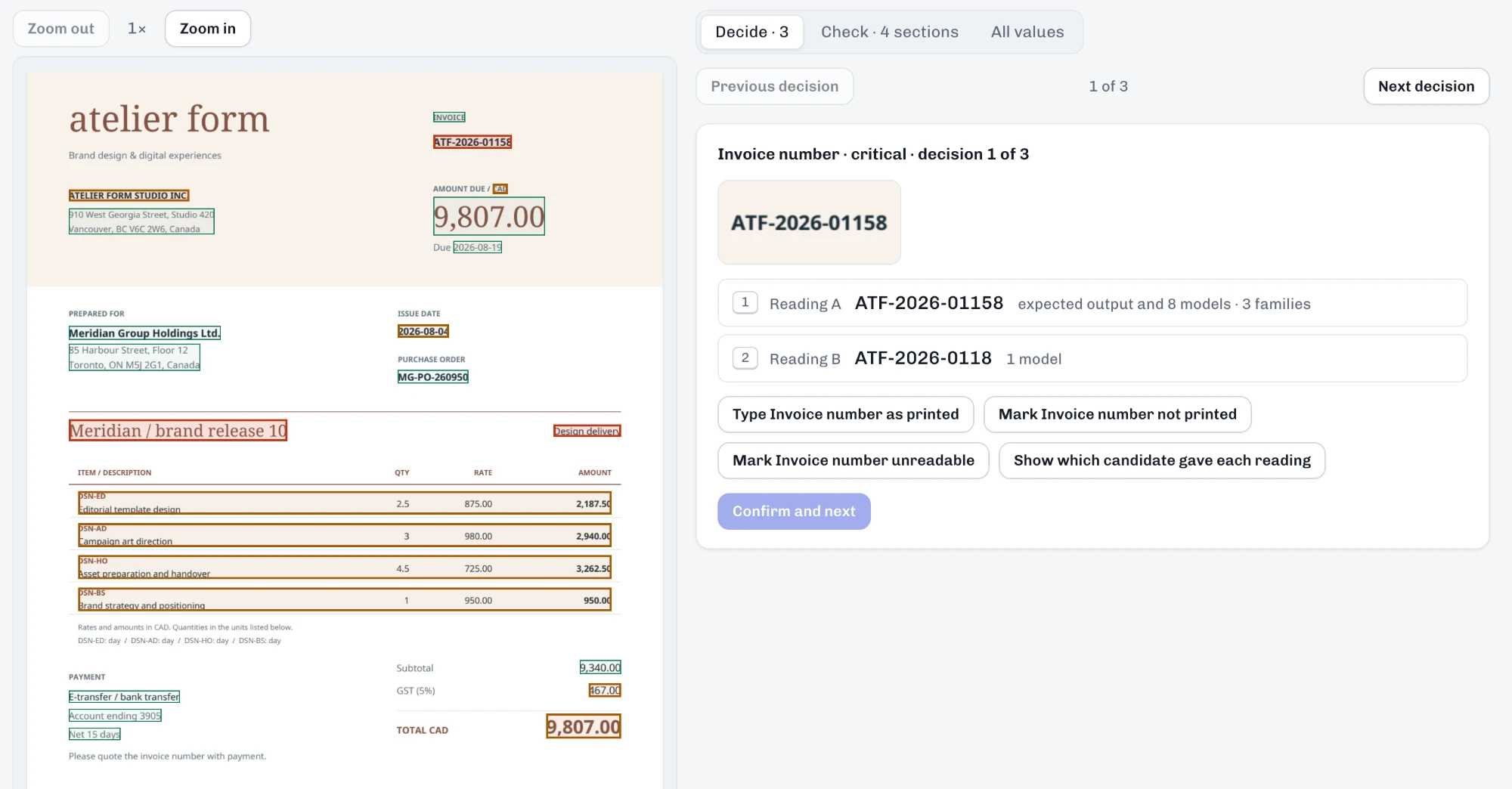
Those reviewed answers become the foundation for optimization. People define the task and establish the answers it is measured against; AI does the repeated proposal-and-test work.
Avoiding overfitting
An optimizer can find instructions that work well on the examples it has seen but don't generalize to other documents — a classic problem called overfitting.
To protect against that, AI Document Workbench separates development documents from held-out documents. The AI loop only sees the development documents while optimizing the prompt, and then the final prompt is compared with previous versions on the held-out set, which it has never seen.
The trial shows what improved and what regressed. Repeated runs also estimate ordinary variation, so an apparent gain can be assessed against the model's tendency to answer differently without any prompt change.
Turn the results into a business decision
After optimization and evaluation, the team can compare configurations on questions that matter operationally:
- How many documents does each get right on the critical fields?
- How often does it complete the task successfully?
- Which documents would become regressions relative to the current configuration?
- What is its model cost per document, and what would that mean at the expected monthly volume?
AI Document Workbench brings those measures together. Quality scores include uncertainty intervals. Comparisons against a baseline expose cases where the current configuration succeeds and the alternative fails, even when the alternative's overall score is higher. Completion failures remain visible separately.
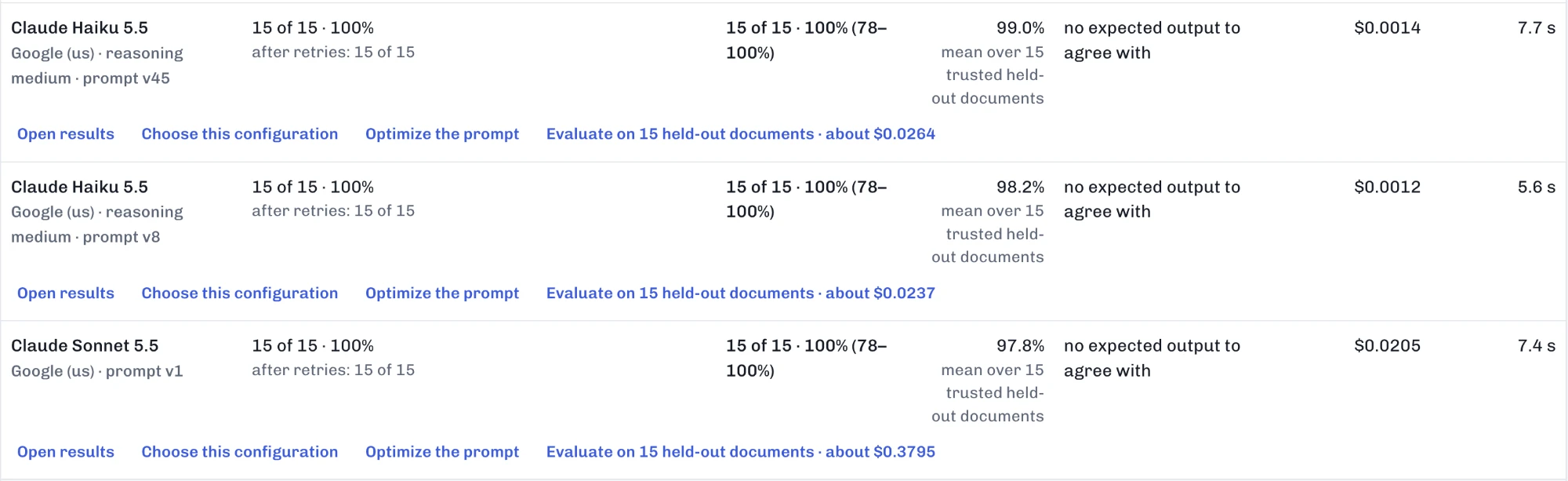
Cost is measured from the calls made on the team's documents, using actual token usage and model prices. The Workbench projects model spend at the volume the team enters, while spending caps bound the experiments themselves.
This lets a team investigate whether prompt optimization brings a cheaper model close enough to the quality it needs, or whether a more expensive model delivers enough additional quality to justify its cost. The cost-versus-quality view makes those trade-offs visible so the business can decide which are acceptable.
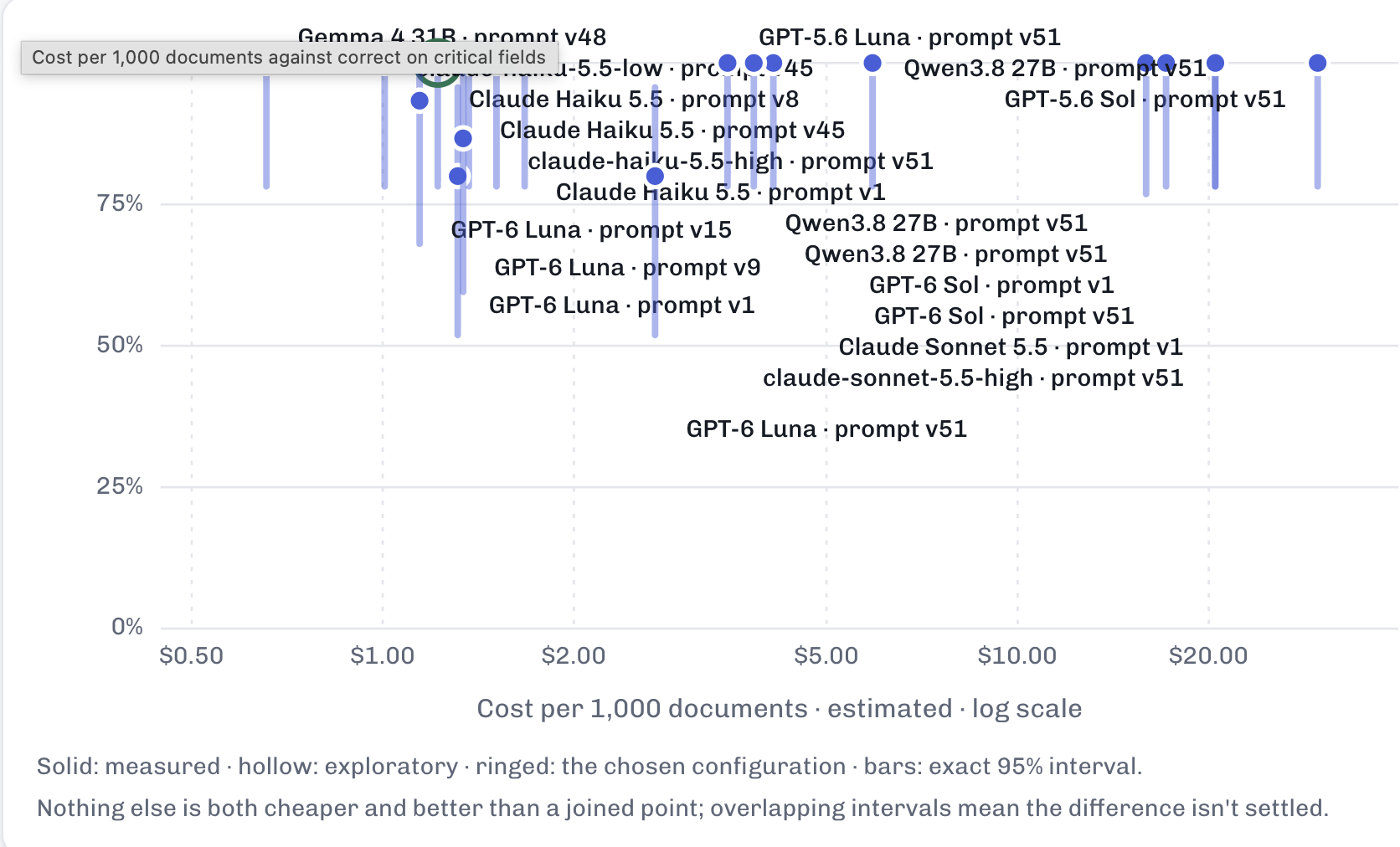
The comparison remains tied to the task: these documents, these rules, these prompts, and the measured results. Public benchmarks are a useful signal for deciding what to try, but AI Document Workbench provides the evidence to support the decision.
Make the next model easier to evaluate
The same workflow can be used when another model becomes available: add it, measure its starting performance, optimize its prompt within a budget, and compare the resulting configuration with the current one.
This is the next step from the argument in our previous post. Planar makes model choices configurable. Evals make their effects measurable. Automatic prompt optimization helps teams explore alternatives with less manual iteration. Bringing quality and model cost together gives the business a basis for deciding whether a change is worthwhile.
If you are exploring whether another model could do the job well at a better cost, talk to us about AI Document Workbench.
Written by Ruslan Danilin
All perspectives